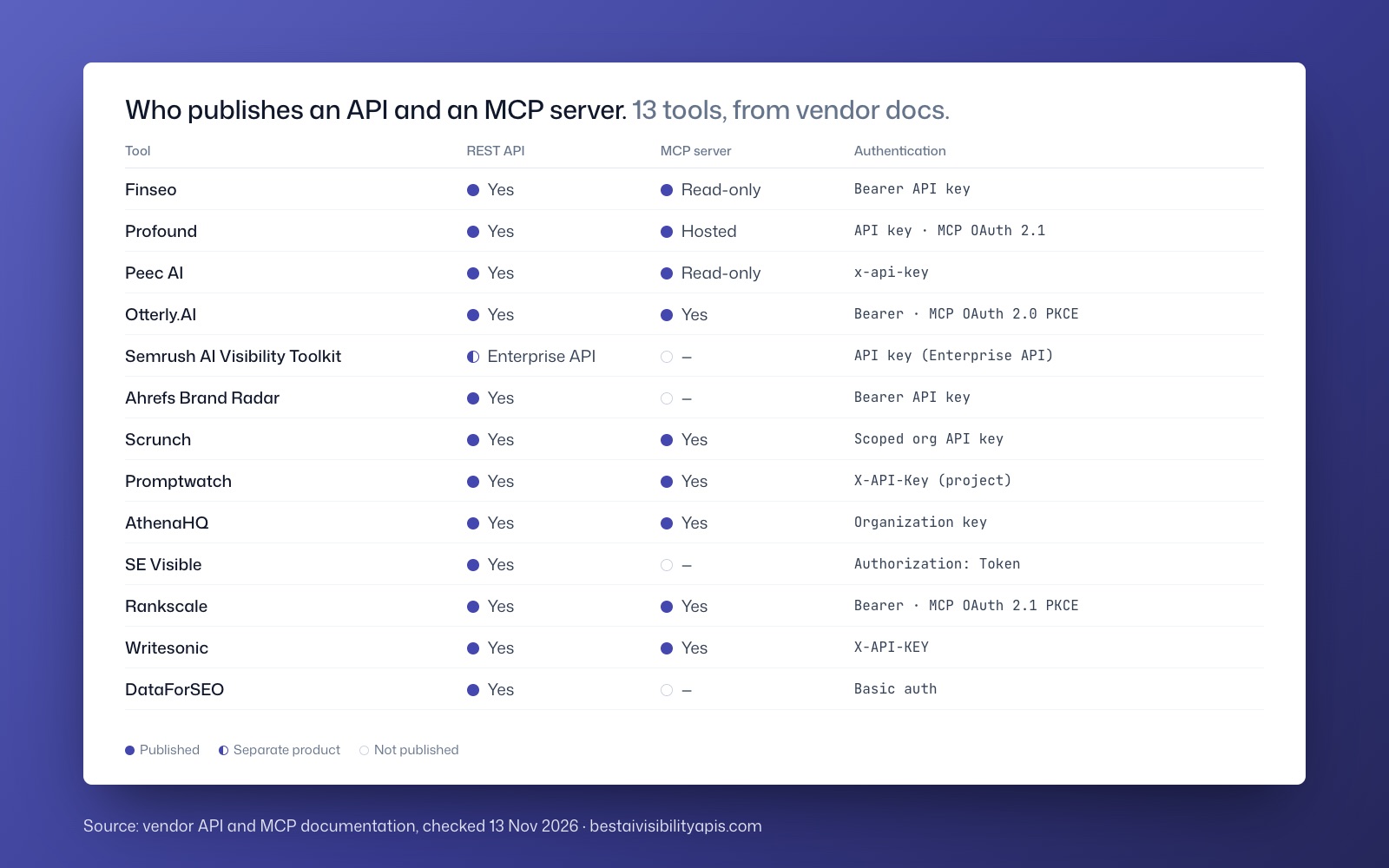
Several SEO and GEO vendors now publish MCP servers, but they do not expose the same data or permissions.
Summarize with ChatGPTClaudePerplexity
View as Markdown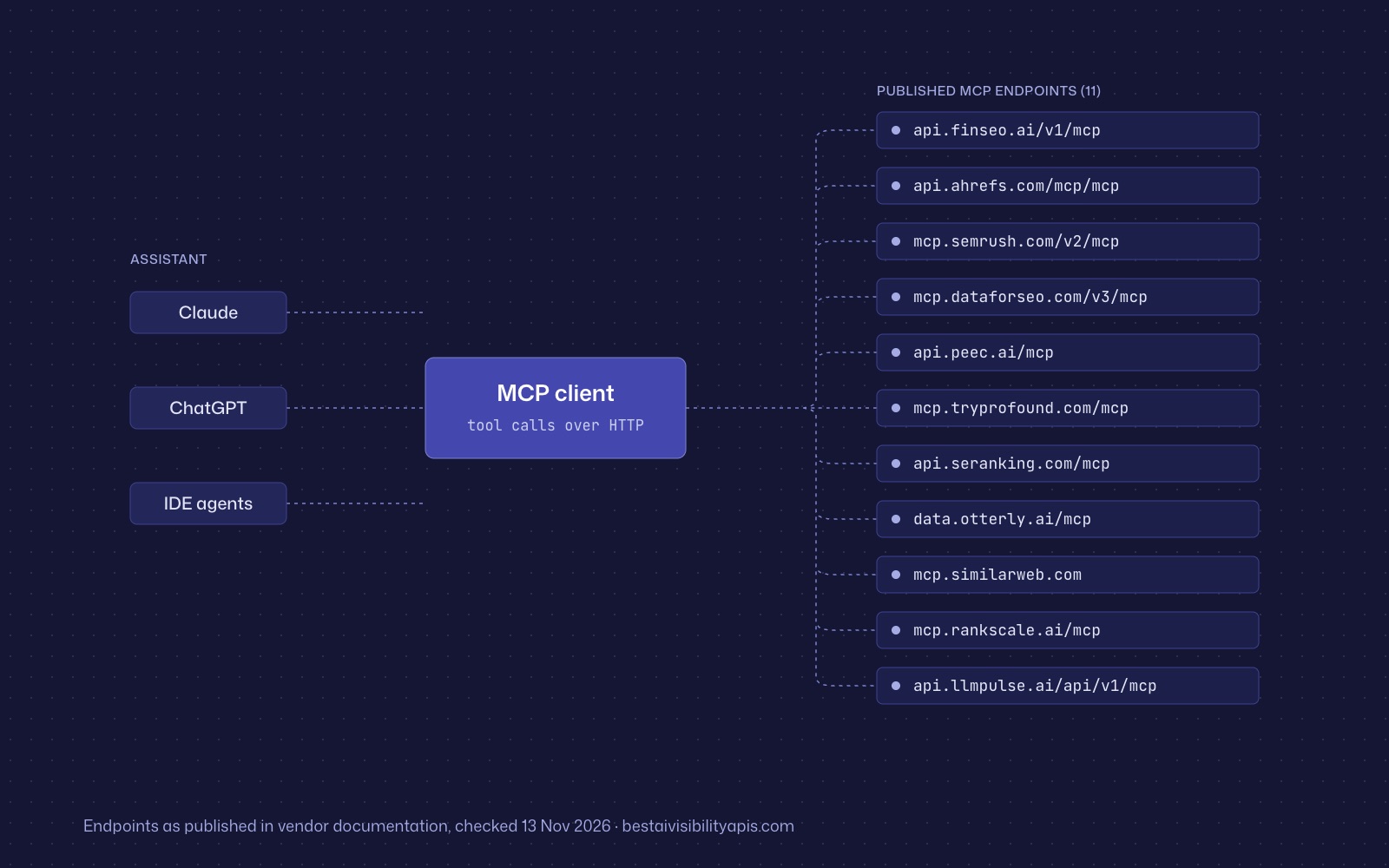
TL;DR
- Finseo provides a read-only GEO MCP server for visibility metrics, prompts, answers, competitors, sentiment, cited sources, fan-outs and tasks.[17]
- Ahrefs, Semrush and DataForSEO provide MCP access to established SEO datasets, but their usage is tied to API units, plan eligibility or pay-as-you-go data consumption.[8][1]
- Peec AI and Profound expose broader action-capable workflows, so their MCP connections require closer review of write permissions and approvals.[9][29]
- Claude accepts remote MCP servers through custom connectors, while ChatGPT support depends on the account type, web interface and supported authentication flow.[30]
- OAuth or another authentication method does not by itself prove that an MCP server is safe; permissions, server trust and approval controls also matter.[30]
- Ahrefs, Semrush and DataForSEO offer MCP access to SEO datasets, but usage depends on API units, eligible subscriptions or pay-as-you-go billing.[13][8]
Several SEO and GEO vendors now publish MCP servers, but they do not expose the same data or permissions. Ahrefs, Semrush, DataForSEO, Finseo, Peec AI, Profound, SE Ranking, OtterlyAI, SISTRIX, Similarweb, Rankscale, Scrunch and LLM Pulse all document MCP access or integrations.
The practical distinction is not simply whether a tool “has MCP.” Compare three things: the dataset available to the assistant, the operations the server can perform, and the commercial access required. Finseo is the strongest fit when the goal is read-only GEO reporting inside Claude or ChatGPT; Ahrefs, Semrush and DataForSEO are primarily SEO-data connections, while Peec and Profound expose broader action-oriented workflows.[1]
Reading time: 11 minutes
What is an MCP server for SEO or GEO?
The Model Context Protocol is an open protocol that lets an AI application connect to external data and tools. It uses JSON-RPC 2.0 and separates the host application, the connecting client and the server that supplies capabilities.[2]
MCP servers can expose three kinds of primitives:
- Resources, which provide data or context.
- Prompts, which provide reusable interaction templates.
- Tools, which the model can call to retrieve data or perform operations.[2][3]
For SEO, an MCP server may let Claude or ChatGPT retrieve rankings, backlinks, keywords, technical-audit data or traffic estimates. For GEO, it may provide tracked prompts, AI answers, citations, competitors, sentiment, share of voice or AI-crawler activity.
MCP availability is therefore an interface decision, not a measurement-quality score. A server can make a vendor’s data accessible inside an assistant without expanding the underlying dataset or adding dedicated AI-answer monitoring.[4][5]
Which SEO and GEO tools offer MCP?
| Tool | MCP endpoint or connection | Main data exposed | Access and permissions |
|---|---|---|---|
| Finseo | https://api.finseo.ai/v1/mcp |
GEO visibility, prompts, answers, competitors, sentiment, sources, fan-outs and tasks | OAuth 2.1 or API key; documented tools are read-only; MCP starts with Starter.[1] |
| Ahrefs | https://api.ahrefs.com/mcp/mcp |
Site Explorer, keywords, SERPs, rank tracking, audits and Google Search Console | Paid plans; calls consume integration API units and retrieval limits apply.[6][1] |
| Semrush | https://mcp.semrush.com/v2/mcp |
SEO API, Trends API and read-only project methods | Eligible subscriptions and API units; no dedicated prompt-level AI-visibility data through public MCP.[7] |
| DataForSEO | https://mcp.dataforseo.com/v3/mcp or local package |
SERP, keyword, backlink, on-page, labs and domain data | Underlying API usage is pay-as-you-go; published minimum top-up is $50.[8] |
| Peec AI | https://api.peec.ai/mcp |
Visibility, sentiment, share of voice, sources, bot traffic and configuration | OAuth 2.0 or personal access token; 56 read tools and 50 write tools are documented.[9] |
| Profound | https://mcp.tryprofound.com/mcp |
Visibility, sentiment, citations, shopping, agent analytics and workflows | Enterprise access; broader documentation includes workflow and content operations.[10][3] |
| SE Ranking | https://api.seranking.com/mcp |
Keywords, backlinks, domains, SERPs, audits and selected visibility data | OAuth 2.1 or API key; coverage depends on subscription.[11] |
| OtterlyAI | https://data.otterly.ai/mcp |
Reports, prompts, AI responses, citations, recommendations and crawlability | OAuth-only; most calls count toward plan MCP limits.[12] |
| SISTRIX | Endpoint not published in the cited overview | Rankings, Visibility Index, keywords, competitors and GEO tools | OAuth on all packages; MCP requests do not consume API credits, subject to fair use.[13] |
| Similarweb | https://mcp.similarweb.com |
Traffic, referrals, audiences, keywords and SERP intelligence | Subscription with API/MCP access; requests consume data credits.[14] |
| Rankscale | https://mcp.rankscale.ai/mcp |
AI answers, citations, sentiment, competitors, shopping and local results | OAuth 2.1 with PKCE; write permissions default off.[15] |
| Scrunch | Endpoint not published in the cited overview | Presence, position, sentiment, citations, responses and crawler logs | Account sign-in; creation and update operations are documented.[4][12] |
| LLM Pulse | https://api.llmpulse.ai/api/v1/mcp |
Visibility, share of voice, answers, citations, sentiment and AI traffic | OAuth 2.1 with separate read/write scopes; MCP is included on every plan.[16] |
Checked against the vendors’ published MCP, documentation and pricing pages on 13 November 2026.
How was the comparison made?
The comparison uses five criteria:
- Dataset: whether the server exposes traditional SEO data, AI-answer visibility data or both.
- Operation scope: whether tools are read-only or can create, update, publish or otherwise modify data.
- Connection method: whether the vendor provides a hosted Streamable HTTP endpoint, local package, OAuth flow or API-key authentication.[11][1]
- Commercial boundary: plan requirements, API units, credits, response limits and other usage charges.
- Client compatibility: whether the documented setup works with Claude, ChatGPT or developer clients.
This approach follows the methodology principle that MCP availability should not be treated as a proxy for coverage, accuracy or product value.
1. Finseo — best for read-only GEO analytics in an assistant
Finseo’s MCP server connects Claude, ChatGPT and other compatible clients to existing AI-visibility data through https://api.finseo.ai/v1/mcp.[16][17] Finseo hosts data in Frankfurt, Germany, with EU data residency, is GDPR-compliant and ISO 27001 certified, and offers a data processing agreement (DPA) for every organisation. For enterprise teams it provides SSO via SAML, roles per project, an audit trail and unlimited seats, as listed on its enterprise page. From the Business plan it also adds an action layer: a prioritized task list scored by impact and effort, plus content optimization with an AEO score.
Key features
- Visibility metrics, visibility history and model or tag filters.[18][12]
- Tracked prompts and the underlying AI answer content.[2][17]
- Competitor rankings, head-to-head comparisons and gap analysis.[18][8]
- Cited sources, source domains and sentiment summaries.[15]
- Query fan-outs and tracked tasks.[17]
- Read-only tools that retrieve data without changing the project.[9][15]
- OAuth 2.1 with Dynamic Client Registration and PKCE for Claude and ChatGPT.[17][15]
The server supports a maximum 90-day window for visibility time-series requests, and relative date ranges default to the previous 30 days ending yesterday.[17]
Strengths
- It exposes dedicated GEO data rather than treating AI visibility as estimated referral traffic.
- The read-only design limits the risk of an assistant changing prompts, projects or content.
- MCP is included in Finseo’s Starter plan, which lists 50 tracked prompts, three selected models and one project.[16][19]
- Starter costs EUR84 per month (about $93), or EUR70 per month (about $77) billed yearly; prices exclude VAT.[19]
Limitations
- MCP access does not include the separate REST API entitlement on Starter or Business; API access begins with Growth.[1][19]
- The three-model parallel limit applies to Starter, Business and Growth, while Enterprise lists all 23 models.[19][1]
Pricing checked 13 November 2026
- Starter: EUR84 monthly (about $93), or EUR70 per month (about $77) on annual billing.
- Business: EUR210 monthly (about $231), or EUR175 per month (about $193) on annual billing.
- Growth: EUR479 monthly (about $528), or EUR399 per month (about $439) on annual billing.
- Enterprise: custom pricing.[19][14]
Verdict: Best for SEO or content teams that want Claude or ChatGPT to inspect measured GEO visibility, citations and competitor gaps without granting write access.
2. Ahrefs — best for broad established SEO datasets
Ahrefs’ MCP endpoint is https://api.ahrefs.com/mcp/mcp.[21] Its documented categories include Site Explorer, Keywords Explorer, SERP Overview, Rank Tracker, Site Audit and Google Search Console, covering backlinks, organic keywords, competitors, audits and connected search-performance history.[22]
Key features
- Organic keyword and competitor research.
- Backlinks and referring-domain data.
- Keyword volumes and suggestions.
- Site-audit issues.
- Rank-tracking information.
- Google Search Console performance history.[22]
Strengths
- Broad coverage of conventional SEO workflows.
- Published tool categories make it relatively clear which datasets are available.
- MCP has no separate additional fee, although calls consume integration API units.[6]
Limitations
- Ahrefs restricts its external MCP to interactive workflows in compatible AI clients.
- Custom scripts, bridges and standalone HTTP/JSON-RPC clients are not permitted under the cited documentation.[21]
- Lite, Standard and Advanced plans have different monthly unit and row-per-request limits.[6]
Verdict: Best for teams that want an assistant to investigate established SEO datasets, especially backlinks, keywords, SERPs and audits.
3. Semrush — best for SEO and AI-channel traffic analysis
Semrush provides https://mcp.semrush.com/v2/mcp and documents access to Trends API methods, SEO API methods and read-only Project API methods.[1]
Key features
- SEO research and domain data.
- Trends and market analysis for eligible subscriptions.
- Read-only project methods.
- AI-channel traffic estimates, referrers and receiving pages.[23][22]
Strengths
- Useful for combining conventional SEO context with estimated traffic from AI channels.
- OAuth is the default authentication method, with API-key authentication also documented.[12]
- The MCP server can access large established API families through an assistant.
Limitations
- Public MCP does not directly expose AI Visibility Toolkit or Enterprise AIO prompt responses, mentions, citations, sentiment, source visibility or AI share of voice.[7]
- Requests consume the same API units as direct API calls.
- Project creation and settings changes are excluded from the documented read-only Project API scope.[24]
Verdict: Best for SEO teams analysing AI-assisted traffic and search-market data, not for dedicated prompt-level GEO monitoring.
4. DataForSEO — best for API-driven SEO research
DataForSEO offers both a hosted endpoint, https://mcp.dataforseo.com/v3/mcp, and a local npm installation.[8]
Key features
- SERP data.
- Keyword and Labs data.
- Backlinks.
- On-page analysis.
- Business Data.
- Domain Analytics.
- A newer gateway architecture with documentation search and authorized API requests.[25]
Strengths
- Flexible API-oriented deployment.
- Both local and hosted connection paths are documented.
- Useful when an assistant needs to discover API documentation before initiating an authorized request.[26]
Limitations
- Underlying API activity is pay-as-you-go.
- The published minimum top-up is $50, with a $1 trial credit.[8]
- Older tutorials may describe a legacy server with more than 80 endpoint-specific tools; the current quickstart describes a lighter gateway model.[25]
- A blanket read-only restriction is not published in the cited quickstart.[27][25]
Verdict: Best for developers who want an assistant to work with a broad, metered SEO API rather than a packaged GEO dashboard.
5. Peec AI — best for visibility analysis with controlled write workflows
Peec AI publishes https://api.peec.ai/mcp using Streamable HTTP and supports OAuth 2.0 or a personal access token.[28][9]
Key features
- Visibility, sentiment and share of voice.
- Positions, cited domains and URLs.
- Source content and AI-bot traffic.
- Project, prompt and brand management.
- Content rewriting and CMS publishing operations.[20]
Strengths
- Strong coverage of dedicated AI-visibility metrics.
- MCP is included across the listed Starter, Pro, Advanced and Enterprise plans.[1]
- The reference distinguishes 56 read tools from 50 write tools.[20]
- Write calls require owner access and trigger confirmation according to the tools reference.[20]
Limitations
- The server is not read-only.
- Project creation, prompt management and publishing can change account or website state.
- Plan limits and credit pools still constrain actions.[20]
Verdict: Best for teams that want to move from GEO analysis into controlled optimization workflows, provided write permissions are deliberately managed.
6. Profound — best for enterprise GEO workflows
Profound documents https://mcp.tryprofound.com/mcp and lists Enterprise as the required access level.[3]
Key features
- Visibility, sentiment and citation data.
- Shopping reports and agent analytics.
- Raw data access.
- Workflows, prompts, knowledge-base documents, collaborative documents, projects and tasks.[3]
Strengths
- Broad enterprise-oriented coverage.
- OAuth 2.1 and bearer-token authentication are documented.
- Connection instructions cover Claude Code, Claude Desktop, Cursor, OpenCode, VS Code and Windsurf.[24]
Limitations
- Public MCP-specific pricing is not published in the cited overview.
- Profound’s analytics-capabilities page describes read-only tools, while its broader overview documents workflow and content-management operations.[3][1]
- The scope must therefore be evaluated by operation rather than by the general MCP label.
Verdict: Best for enterprise teams that need GEO analytics alongside workflows and content or project operations.
How does MCP connect SEO tools to Claude and ChatGPT?
MCP servers commonly use Streamable HTTP for hosted remote connections, while local packages may use standard input/output transport.[2] The protocol defines how tools are discovered and called; the vendor still determines authentication, account requirements and available operations.[2][29]
Connect an SEO or GEO MCP server to Claude
- Open Customize > Connectors in Claude, then select Add custom connector.[28][1]
- Enter a recognizable name for the vendor.
- Paste the vendor’s HTTPS MCP endpoint, such as Finseo’s
https://api.finseo.ai/v1/mcp.[18] - Continue and review the authentication method detected by Claude.
- Select the appropriate sign-in option, such as signing in immediately or when needed.[30]
- Complete the vendor’s OAuth or API-key flow.
- Review the connector and available tools before using it in a conversation.
For organization-managed Claude accounts, an owner may need to add the connector through organization settings before members can connect it.[30]
Connect an SEO or GEO MCP server to ChatGPT
- Open ChatGPT on the web and go to the current custom MCP or connector settings.
- Choose the option to add a custom MCP server.
- Enter the server name and public HTTPS endpoint.[29]
- Configure authentication and review the risk warning.
- Create or install the connector.
- Inspect the discovered tools and their permissions.
- Start a new conversation and select the connector before asking for data.[28]
OpenAI’s documentation limits full custom MCP support by account type and platform; Pro supports custom servers with read or fetch permissions, while broader support is documented for Business and Enterprise/Edu on the web.[29] Mobile custom MCP connections are not supported, and local servers require a supported secure tunnel rather than a direct local connection.[29]
Vendor setup pages can lag behind client interfaces. OpenAI’s current instructions use the custom MCP or connector flow.[1][25] Use the vendor documentation for the endpoint and authentication details, but use the client provider’s current interface instructions for the final connection steps.
What should you check before enabling an MCP server?
Check the following before authorizing a server:
- Whether the tools are read-only or can write data.
- Whether the server can publish content, modify prompts or change project settings.
- Which API units, credits or response quotas are consumed.
- Whether the server requires OAuth, an API key or a personal access token.
- Which account tier is required.
- Whether external content retrieved by the server could contain prompt-injection instructions.
- Whether every requested permission is necessary for the workflow.
Finseo documents read-only tools, Rankscale defaults write permissions off, and Peec documents confirmation for write calls.[15] These controls are useful, but they address different parts of the integration and should not be reduced to a single security label.
What are the main MCP security risks?
Authentication is only one part of MCP security. A 2026 measurement study found that 40.55% of 7,973 validated remote MCP servers exposed tools without authentication, and it identified weaknesses in some OAuth implementations.[31] Those findings do not establish vulnerabilities in the SEO and GEO tools discussed here.
Treat retrieved web content as untrusted input, grant the smallest practical tool set, and require confirmation for write or credit-spending actions. OpenAI warns about prompt-injection exposure from untrusted MCP servers, while Claude recommends reviewing scopes and approvals, monitoring actions and disabling unused connectors.[29]
Which MCP server should you choose?
- For measured GEO visibility: Choose Finseo when read-only access to prompts, answers, citations, competitors and sentiment is the priority.[12][16]
- For conventional SEO research: Choose Ahrefs when backlink, keyword, SERP, audit and GSC data are central.[22]
- For SEO plus AI-channel traffic: Choose Semrush, while recognising that traffic estimates are not prompt-level visibility metrics.[7]
- For developer-controlled API access: Choose DataForSEO when pay-as-you-go SEO APIs and local or hosted deployment fit the workflow.[8]
- For GEO analysis plus optimization actions: Consider Peec AI, but review its write tools and owner-confirmation requirements.[20]
- For enterprise workflows: Consider Profound when Enterprise access and broader workflow operations are appropriate.[3]
- For metered AI-response reporting: Consider OtterlyAI, whose MCP calls generally count toward plan limits and whose MCP authentication is OAuth-only.[12]
- For granular write controls: Consider Rankscale, where write permissions default off and credit-spending actions require confirmation.[15]
MCP is most useful when the assistant’s connection matches the team’s actual job. A keyword-research server, an AI-answer monitoring server and a content-publishing server may all use the same protocol while solving different problems.
Frequently asked questions
What is an SEO MCP server?
An SEO MCP server connects an AI application such as Claude or ChatGPT to an SEO vendor’s external data and tools. Depending on the vendor, it may expose keywords, backlinks, SERPs, audits, rankings, traffic or Google Search Console data.[8]
What is a GEO MCP server?
A GEO MCP server connects an assistant to AI-search visibility data such as tracked prompts, generated answers, citations, sentiment, competitors and share of voice. Finseo, Peec AI and Profound document MCP capabilities that include dedicated AI-visibility analytics.[20]
Does Semrush MCP track ChatGPT mentions?
Semrush’s public MCP exposes SEO and Trends data plus estimated AI-channel traffic, but its own AI-brand-visibility documentation says it does not directly expose dedicated prompt responses, mentions, citations, sentiment, source visibility or AI share of voice through that MCP.[7]
Is Finseo MCP read-only?
Yes. Finseo’s documented MCP tools are read-only and retrieve visibility, prompts, answers, competitors, sources, sentiment, fan-outs and tasks without modifying the project.[17] Finseo includes MCP in Starter, while separate REST API access begins at Growth.[1][19]
Can ChatGPT connect to an SEO MCP server?
ChatGPT can connect to supported remote MCP servers through its custom MCP or connector flow on the web, subject to account type and authentication requirements.[29][30] Mobile custom MCP connections are not supported, and local servers require a supported secure tunnel.[29]
Is MCP safe for SEO data?
MCP safety depends on the server, authentication, permissions, client and retrieved content rather than on the protocol alone. A 2026 study found unauthenticated tools in 40.55% of 7,973 validated remote MCP servers, so teams should use minimum permissions, review scopes and require approval for write actions.[31]
Sources
- 1Semrush MCP overview | Semrush APIdeveloper.semrush.com
- 2Architecture overviewmodelcontextprotocol.io
- 3Profound MCP overviewdocs.tryprofound.com
- 4Meet Scrunchiedevelopers.scrunch.com
- 5AI Visibility Toolkit Pricing | Semrushsemrush.com
- 6Getting started with Ahrefs MCP | Help Center - Ahrefshelp.ahrefs.com
- 7AI brand visibility: Skill for Semrush MCPsemrush.com
- 8SEO MCP Server — Real SEO Data for Claude, Cursor & AI Agents – DataForSEOdataforseo.com
- 9MCP Serverdocs.peec.ai
- 10Pricing | Profoundtryprofound.com
- 11SE Ranking MCP: Setup & Configurationseranking.com
- 12OtterlyAI MCP Serverdocs.otterly.ai
- 13SISTRIX MCP Servers - Use Cases, Setup and Updates - SISTRIXsistrix.com
- 14Similarweb Documentationdocs.similarweb.com
- 15Rankscale MCP Server Docs | Rankscalerankscale.ai
- 16MCP Server for AI Visibility Analytics | LLM Pulsellmpulse.ai
- 17Finseo MCP Server: Claude, ChatGPT & Cursordocs.finseo.ai
- 18AI Visibility MCP Server for Claude & Cursor | Finseofinseo.ai
- 19Pricing, Starter, Business, Growth & Enterprise | Finseofinseo.ai
- 20Tools Referencedocs.peec.ai
- 21What is Ahrefs MCP | Ahrefs Docsdocs.ahrefs.com
- 22Tool Categories | Ahrefs for Developersdocs.ahrefs.com
- 23Analytics capabilities - Profounddocs.tryprofound.com
- 24Connecting to Profound MCPdocs.tryprofound.com
- 25DataForSEO New MCP Server and CLI Connection: A Quickstart Guide – DataForSEOdataforseo.com
- 26Authenticationdocs.tryprofound.com
- 27Prerequisitesdevelopers.google.com
- 28Setup Guidedocs.peec.ai
- 29Connecting custom MCP servers in ChatGPT | OpenAI Help Centerhelp.openai.com
- 30Add a connector that isn't in the directory - Claude.ai Documentationclaude.com
- 31A First Measurement Study on Authentication Security in Real-World Remote MCP Serversarxiv.org